

No session. My packs opens Whop sign-in in your browser.
Command: npx buddies
Closer is a skill pack for Claude Code, Cursor and Codex. Paste a lead’s message and it drafts the reply, a proposal when it fits, and your next step. Nothing is sent without you.
$29 once, no subscription · Claude Code, Cursor or Codex
Each one has its own way.
One command installs Closer in your project. Then you talk to it in Claude Code, Cursor or Codex, like any other chat.
No session. My packs opens Whop sign-in in your browser.
Command: npx buddies
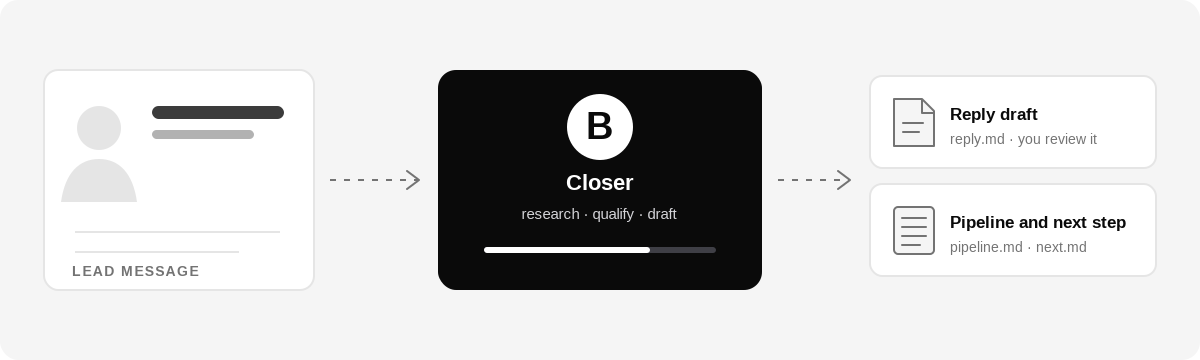
Example: a lead asks for your scope and price. Draft the reply.
 Your packCloser · your AI · your project
 Codex
 Claude Code
 Cursor
Closer installs for Claude Code, Cursor and Codex. You review every file before anything reaches a customer.
Closer does the prep in your project. You decide what goes to a customer.
Run npx buddies install closer in your project folder and sign in with Whop. Nothing is written until the purchase is confirmed.
Pick Claude Code, Claude Desktop, Cursor or Codex in the installer. It opens with the activation prompt ready to send (in Claude Desktop you paste it in a Code session).
Paste the lead’s message or say who you want to reach. Closer asks only for what blocks the work, like price or channel.
You get the reply or first message, a proposal when it fits, and the pipeline with the next step. You send it yourself.
After checkout, run npx buddies install closer in your project folder.
Installer screens: real text from buddies 0.5.3. The editor part is a reenactment.
What you can check before you buy
In your project
Plain files you own, not another dashboard
Your approval
Nothing is sent without you
Picks up later
State saved between sessions
No made-up facts
What is unknown stays marked unknown
Real installer
Every file it writes is listed
Sold on Whop
Checkout and access in your Whop account
Each pack is $29, paid once on Whop. Pick the job you want done first.
Individual
$29one-time
Included
All packs
Coming soon
Every Buddies pack in one purchase, coordinated toward one goal. No date promised.
Planned
After you pay
Secure checkout on Whop. If the installer can’t install the pack you bought, ask for a refund within 7 days.
What you get, what it does not do, and how to install it.
The Closer pack, installed in your project: one skill that runs the offer, research, reply and follow-up roles, plus its references. Each run saves plain files in buddies-output/closer/: the reply or first message, the pipeline, the next step, and a proposal when the deal calls for it. One-time payment, no subscription. It does the prep; it cannot guarantee sales.
A prompt starts from zero every time. Closer keeps your offer, decisions and pipeline in your project, picks up where it stopped and checks its own files before handing them to you.
Claude Code (terminal or the Code tab in Claude Desktop), Cursor or Codex, opened in a project folder, plus Node.js 20.12 or newer for the one install command. It does not install into ChatGPT or claude.ai in the browser. Tested on macOS; Windows and Linux are not verified yet. Closer answers in your language. Open the install page
To install, the installer signs you in to Whop, checks the purchase and downloads the pack. Without a purchase it stops and writes nothing. While you work, Closer runs inside your AI tool, so your messages follow that tool’s terms. Your sales files stay in your project. Read the privacy notes
No. It prepares drafts. Sending, scheduling or updating a CRM only happens with a tool you connected, your explicit approval and the real message ID recorded.
Yes. If the installer can’t install the pack you bought on your computer, ask for a refund within 7 days through Whop support.
Fixes and improvements to the pack you bought are free: run the install command again. A reinstall never replaces your buddies/workspace/.
Yes. The license is personal: install it in your own projects and on your own computers. Do not share the pack files.
Closer, Yard, Cut, Desk and Index are on sale, each $29 one-time with its own install command. Brief and Signal are in development. House, all packs in one purchase, is coming soon. See all packs
Install Closer with one command and run it in the AI you already use.
$29 one-time · no subscription